
Writers these days seldom create content without any help from some tool. Whether it be a paraphraser, a grammar checker, or a plagiarism detector, almost all types of writers are using these tools.
However, the tools I just mentioned are for highly specific tasks. What if all such content optimization tools were provided by a single platform? That would save writers from having to work with multiple applications or online tools.
One such platform is Editpad. In this article, we will comprehensively cover this toolkit and its features, pros, and cons. So, if you are trying to find a dedicated platform that helps you with content writing tasks, this review might solve your problem.
Paraphrasing Tool
This is one of Editpad’s most popular tools. It rephrases your sentences but keeps the original meaning. You may use it to make sentences clearer or to change the writing style. It works in many languages and lets you upload files like Word documents or PDFs.
Key Highlights
It has 12 different “modes” or styles. Free users can use simple modes like “Smooth” or “Formal.” If you get the Pro version, you get smarter modes like “Creative” or “Academic” that can completely change how the text looks while keeping the main idea.
We tested the tool by entering a short paragraph into it. Here are the results:
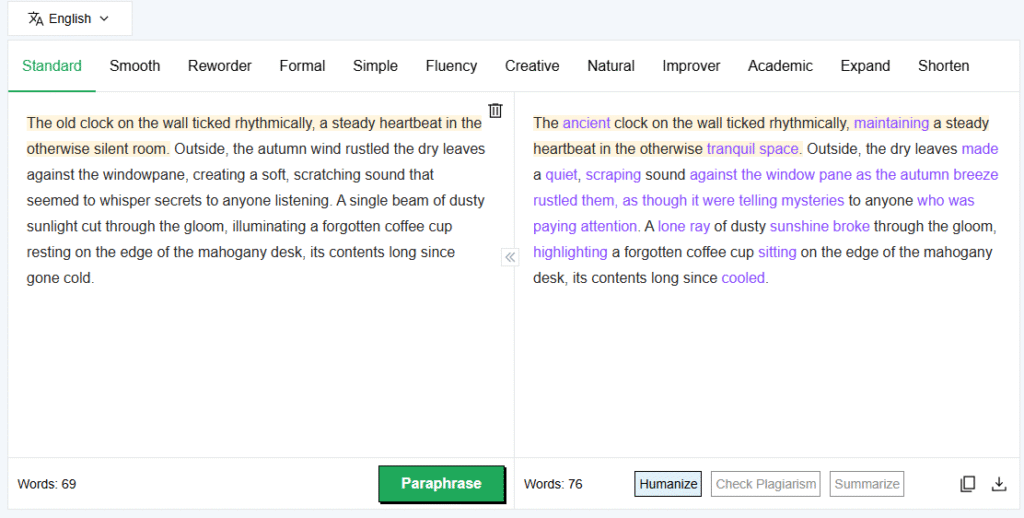
As you can see, even the standard mode offers a pretty decent paraphrasing.
Pros and Cons
Pros:
- Many different modes to choose from.
- Works in over 17 languages, which is great for learning.
- Convenient output modification and saving options.
Cons:
- Most of the paraphrasing modes are not free.
- The free version has ads.
Essay Writer
This tool helps students and writers create essays from scratch. You just give it a topic, and it writes a draft for you. It gives you a highly personalized experience in terms of optimization as will be discussed in the features section. One of the most common use cases of this tool is that it helps you get started when you don’t know what to write.
Key Highlights
You can tell the tool what kind of essay you want, like “Persuasive” or “Descriptive.” There are 13 different options like these. You can also choose how long you want the essay to be.
Another very useful feature is that it can automatically add “citations” (references) in styles like APA or MLA, which is helpful for school papers. Similarly, it also lets users select the academic level, i.e, High School, College, University, or Doctorate. This adds further to the optimization.
In order to see how every feature works, we chose random options and generated the following essay using this tool:
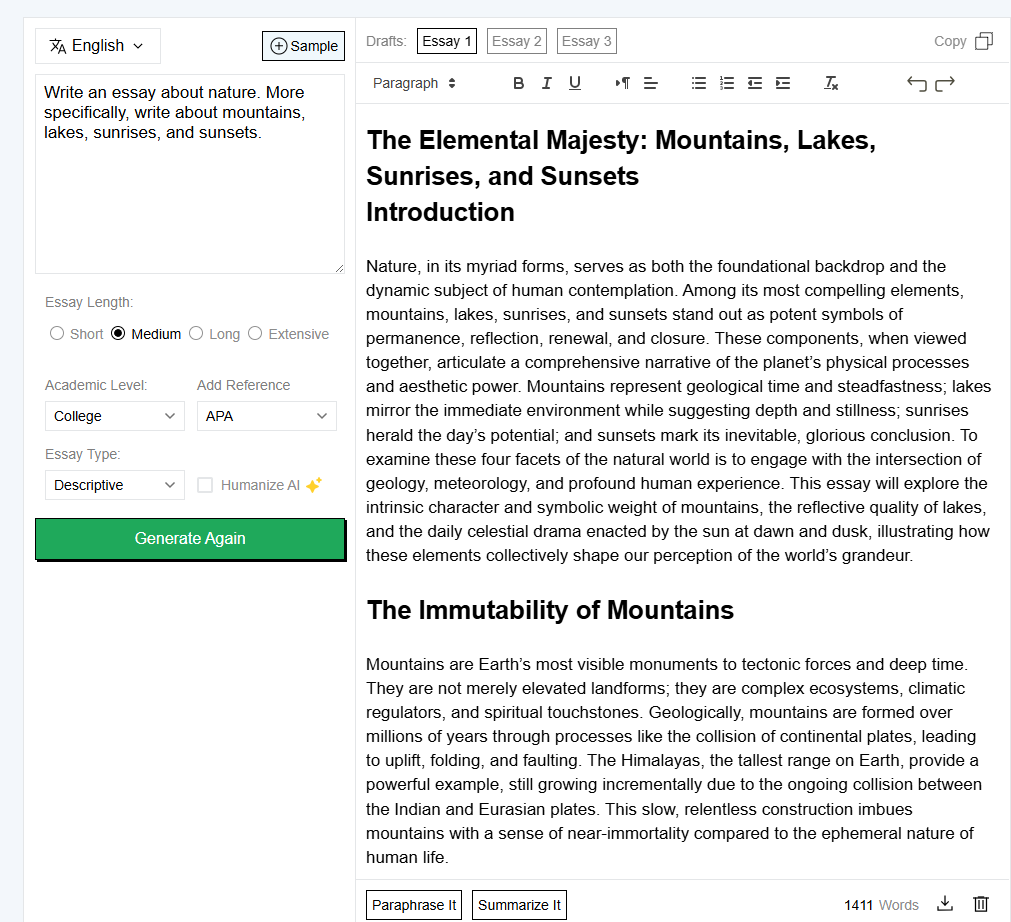
This is the starting part of the essay, but it helps you get the idea. Also, multiple drafts are generated, so if we don’t like one, we can proceed with the other one.
Pros and Cons
Pros:
- Adding references automatically saves a lot of time.
- It has safety filters to stop it from writing bad or inappropriate things.
- You can choose your school level (like High School or College) to get the right writing style.
Cons:
- You still need to check the facts yourself because AI can make mistakes.
- You cannot write very long essays unless you pay.
Text Humanizer
The Humanizer is made to take text written by AI (like ChatGPT) and rewrite it so it sounds like a real person wrote it. This is often used to pass AI detection tests. The advanced algorithms used at the backend of this tool are trained to understand various AI sentence patterns. When the tool detects a pattern like this in an input, it rearranges it to something different. This way, your content becomes undetectable.
Key Highlights
The tool looks at the words and sentence structure and changes them to sound more natural. It has a “Basic” mode for small changes and an “Advanced” mode for deeper rewriting.
To test this tool, we entered the following paragraph into the tool:
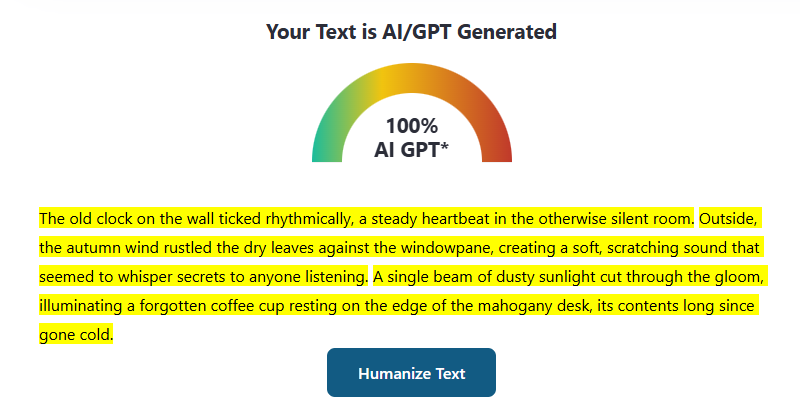
Here is the same paragraph after using Editpad’s AI humanizer:
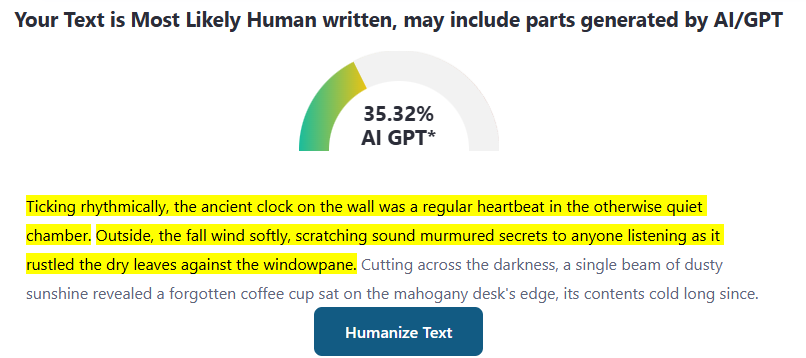
It might not have removed AI completely, but it has reduced the AI Index considerably.
Pros and Cons
Pros:
- Good at fixing robotic-sounding sentences.
- Very easy to use; just one click.
- Quick output.
Cons:
- The free version only lets you check a small number of words at a time.
AI Email Writer
Emails these days are largely automated. The AI Email Writer by Editpad can write such automated emails for you. It can write serious business emails or friendly messages to friends. In other words, it allows for the generation of any type of email.
Key Highlights
While using this tool, you can select whether you are composing a new email or replying to an email. In the latter case, you have to insert the received email as well. You can also choose a tone, such as “Professional,” “Friendly,” or “Urgent.” On top of tones, there are also options for choosing the type of email, such as “Customer Support” or “Job Application.”
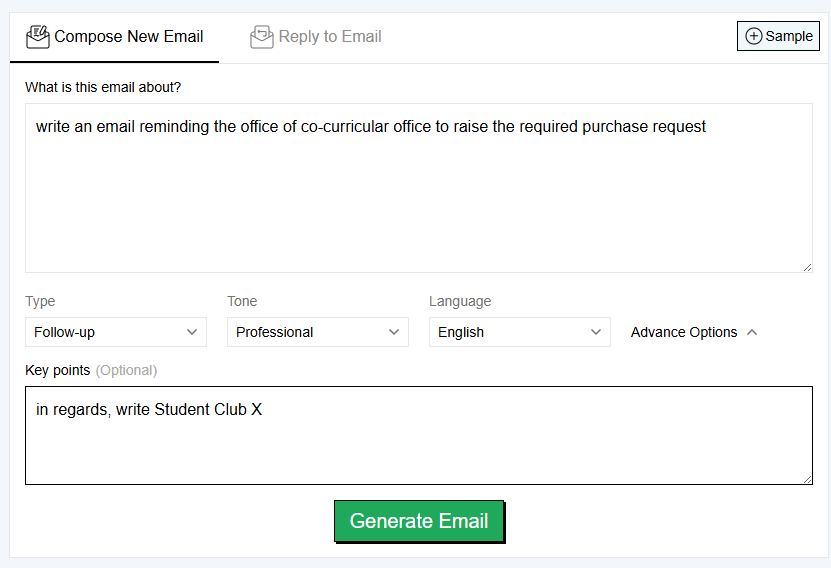
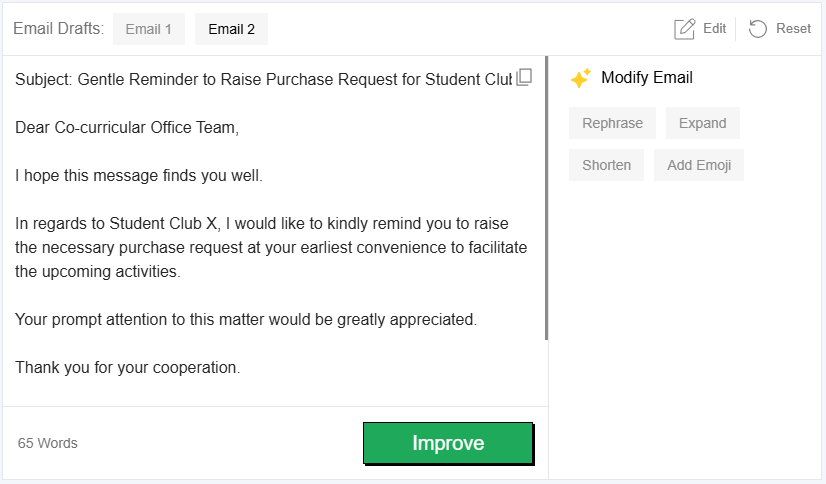
Typically, you type in who the email is for and what it is about in a descriptive way. The tool then writes the subject line and the message. Here is an example of its working.
Input
Output
Pros and Cons
Pros:
- Saves time on boring emails like asking for sick leave.
- Creates good subject lines automatically.
- Mostly free.
Cons:
- You usually have to edit it a little bit before sending.
AI Answer Generator
This tool answers your questions directly. Instead of searching on Google and reading many pages, you just ask a question here and get a direct answer.
Key Highlights
You can choose how the AI answers you. It can be “Professional” and serious, or it can be “Funny” and “Sarcastic.” You can also choose if you want a short answer or a long explanation.
When we tested the tool, these were the results:
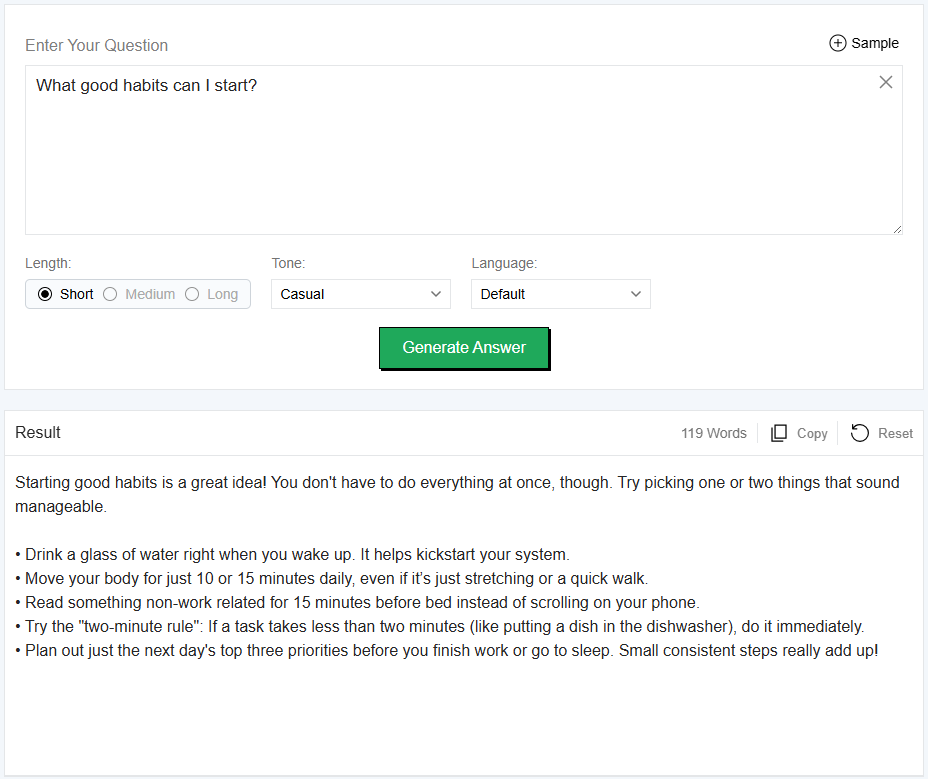
As you can see, the answer is direct and to the point. It can be considered more convenient than search engines.
Pros and Cons
Pros:
- Great for getting quick definitions or understanding hard topics.
- The funny and sarcastic modes are entertaining.
Cons:
- Like all AI, it can sometimes give wrong facts, so don’t trust it blindly.
- It doesn’t remember what you said before, unlike a chatbot.
Plagiarism Checker
This tool scans your text to see if any part of it is copied from the internet. It helps you make sure your work is original. This is important because if plagiarized text is submitted anywhere, it is either disregarded or penalized.
Key Highlights
It compares your writing against millions of web pages. It gives you a score (like “80% Unique”) and highlights the copied sentences. It also helps you create citations for the parts that were found online.
To see the tool’s efficiency, we entered a paragraph from the internet into the tool. It was able to successfully flag it:
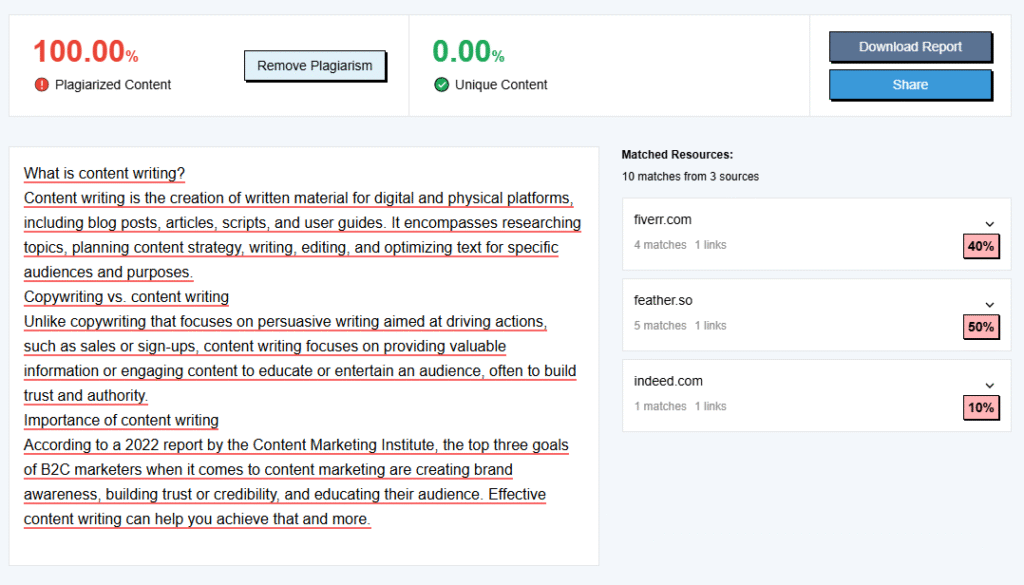
It also gives you the sources from where the content was taken and allows you to download a report.
Pros and Cons
Pros:
- Shows you exactly which sentences are copied.
- Tells you exactly what part is copied, so you can either paraphrase or cite.
Cons:
- The free version only checks 1,000 words at a time.
- It can be slower sometimes.
Text Summarizer
This tool takes a long piece of textual content and makes it short. It keeps only the most important information. Use cases include making a write-up more digestible and quicker to read.
Key Highlights
You can choose to get a short paragraph or a list of bullet points. This allows for great variety. There is also a slider that lets you choose exactly how short you want the summary to be.
Pros and Cons
Pros:
- The slider gives you great control over the length.
- Bullet points are perfect for making study notes or slides.
Cons:
- It might struggle with very complex technical papers.
Extract Text from Image
This tool reads text inside pictures. You can upload a photo of a book page or a screenshot, and it will turn it into text you can edit.
Key Highlights
It accepts common image files like JPG and PNG. It can read printed text and even some handwriting. After it reads the image, you can copy the text or download it as a file. The technology this tool uses is commonly implemented Optical Character Recognition.
To check the working of this tool, we put this image into it:

Here is how it worked:
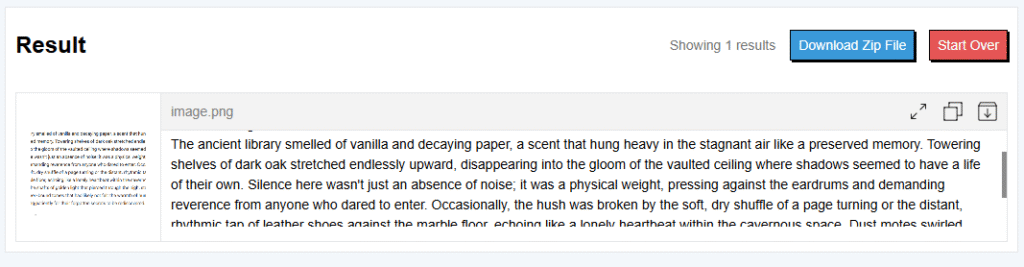
The results were completely accurate.
Pros and Cons
Pros:
- Very useful for digitizing notes from a book or whiteboard.
- Can handle multiple images at once.
- Easy image uploading.
Cons:
- Free users can only upload a few images at a time.
Final Verdict
Editpad is a convenient, all-in-one toolkit perfect for students and casual writers. The free version covers the basics well, though the heavy ads and paywalled advanced features can be limiting. Overall, it is a solid 4/5 resource for quick edits, as long as you verify the AI’s accuracy.